Importing Payables Into QuickBooks
When you export the payables from Virtual Time+Expense, you can easily import them into QuickBooks.
If you are using QuickBooks 2002 or higher, you can use VTSync to import data into QuickBooks.
For older versions (or if you want to handle the data manually), from within QuickBooks, select the 'File|Utilities|Import...' menu (some old versions use the 'File|Import...' menu). Select the file that you saved during the payables download from Virtual Time+Expense (example = "c:\temp\vt_pay.iif").
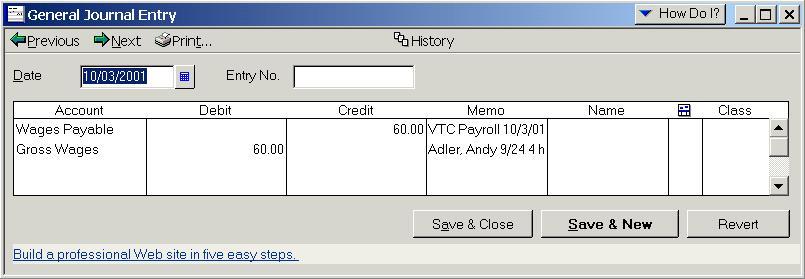
If selected, W2 payroll information will be imported as a Journal Entry. To view the imported W2 payables within QuickBooks, select the "Company|Make Journal Entry" menu. By clicking the 'Previous' button, you can see what Journal Entries you have created.
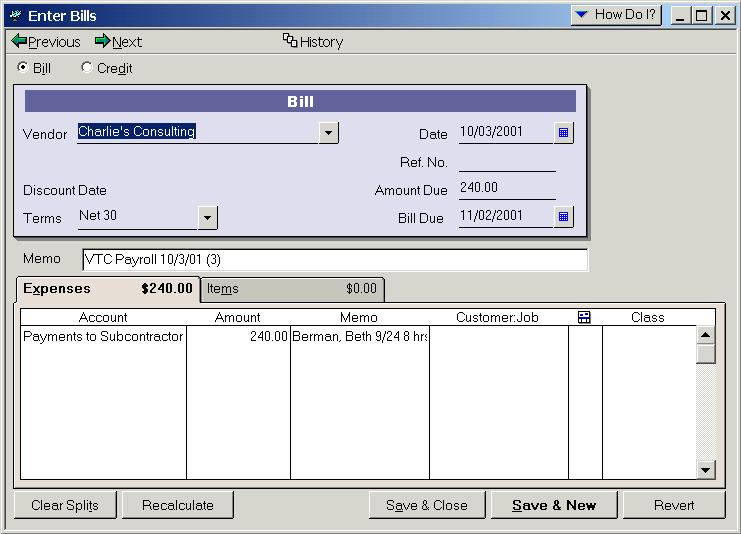
If selected, bills will be created for vendors to pay 1099 and Corp-2-Corp contractors (working for an agency). To view the imported bills within QuickBooks, select the 'Vendors|Enter Bills' menu. By clicking the 'Previous' button, you can see what Bills you have created.
You can also search for the payable ID to see all the information within QuickBooks. To do this, open the Find window (Edit|Find), and type 'VTP XX' in the memo field, where XX is the payable id from Virtual Time+Expense. This will show you both Journal Entries and Bills that were created.